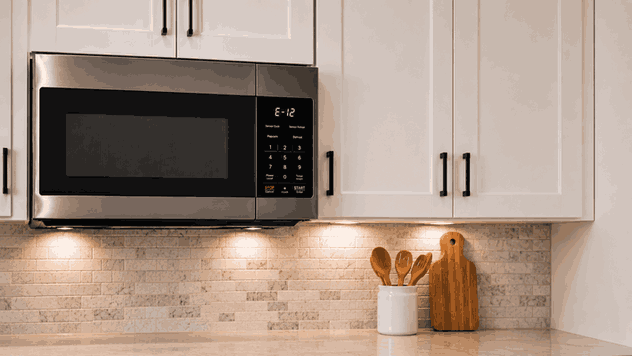
A Dacor microwave buttons not responding problem usually appears when the display is on, but the keypad or touch controls do not react normally. The microwave may ignore Start, fail to accept time settings, beep without changing modes, or respond only after several attempts.
For San Jose homeowners, this can make the microwave feel unreliable even when it still has power. The issue may involve control lock, moisture or residue on the panel, keypad failure, door-switch confirmation, user-interface board problems, or control-board communication.
Before a Dacor microwave can start heating, the control system must read the command from the keypad or touch panel. It also needs to confirm that the door is closed and that the selected function is valid.
When the buttons do not respond, the failure may happen before the heating sequence begins. The microwave may have power, but the user interface may not be sending the correct signal to the control system.
The pattern matters. If no buttons respond, the microwave may be in control lock mode, the touch panel may have failed, or the control board may not be reading input.
If only some buttons fail, the keypad membrane or touch area may be worn or damaged. If the buttons respond slowly or randomly, moisture, residue, or internal communication issues may be involved.
If the microwave accepts settings but will not start, the issue may be related to door-switch confirmation rather than the keypad alone.
Control-panel problems may show several signs:
Start button does not respond
Only some buttons work
Keypad beeps but does not change settings
Touch panel responds slowly
Display works, but controls do not
Control lock indicator appears
Microwave starts only after repeated presses
Buttons fail after cleaning or steam exposure
These details help separate a settings issue from a keypad, door, or control-board fault.
Some button problems begin with visible conditions. Moisture, grease, food residue, or cleaning spray on the panel can interfere with touch response. A control lock or child lock setting can also make the microwave seem unresponsive.
Door position can matter too. Some microwaves will not accept certain commands if the door switch does not confirm closure correctly.
Repair-level causes are different. A damaged keypad membrane, failed touch panel, faulty user-interface board, loose ribbon connection, door-switch fault, wiring problem, or main control-board failure can keep buttons from responding even after basic checks.
Start with safe visible checks. Wipe the control panel gently with a soft, dry cloth. Avoid spraying cleaner directly onto the keypad or touch panel.
Check whether control lock or child lock is active. If the display shows a lock symbol or the microwave ignores inputs, review the model’s lock setting.
Open and close the door normally. Make sure no food debris is blocking the latch area.
If the microwave was recently cleaned or exposed to steam, allow the panel to dry fully before trying again.
Do not remove the microwave cover, open the control panel, test wiring, replace boards, or touch internal components. Microwaves can hold dangerous high-voltage energy even when unplugged.
Pressing the same button again and again may temporarily register a command, but it does not fix a failing keypad, moisture-damaged panel, weak door-switch signal, or control-board fault.
Repeated force can also damage a worn membrane or make the panel less reliable. If the same buttons fail consistently or the control panel behaves randomly, the failure pattern should be diagnosed properly.
Bestech Repair approaches a Dacor microwave buttons not responding issue by checking where the command sequence fails.
A technician can evaluate keypad response, lock settings, door-switch confirmation, display behavior, user-interface communication, control-board response, and related power symptoms.
The goal is to separate a simple panel condition from a true keypad, door-switch, or control-level failure.
A microwave with unresponsive buttons can interrupt daily reheating, cooking, and built-in kitchen use. In San Jose and Bay Area homes, Dacor microwaves are often part of premium kitchen layouts, so reliable control operation matters.
Bestech Repair provides Dacor microwave repair in San Jose and the Bay Area, including keypad problems, touch-panel failures, no-heat issues, display faults, door-switch concerns, power board issues, and control errors.
A Dacor microwave buttons not responding issue may be caused by control lock, moisture, residue, worn keypad contacts, touch-panel failure, door-switch problems, user-interface faults, wiring issues, or control-board failure.
Homeowners can safely check the control lock, clean the visible panel, confirm door closure, and allow the panel to dry. Do not open the microwave cover. If the controls remain unresponsive, professional microwave diagnosis is the safer next step.
Bestech Repair – San Jose, CA
📍 Address: 919 S Winchester Blvd, San Jose, CA 95128
📧 Email: office@bestechrepair.com
📞 Phone: +1-408-906-8668
🕒 Open Hours: Monday – Sunday: 8:00 AM – 8:00 PM.
Read reviews about our repair, installation and maintenance services. Our trained experts are always ready to help. To schedule your next appointment, give us a call or complete our online form.

Leave your contact details for communication with the operator, indicate a convenient date for yourself and our operators will contact you or call us: