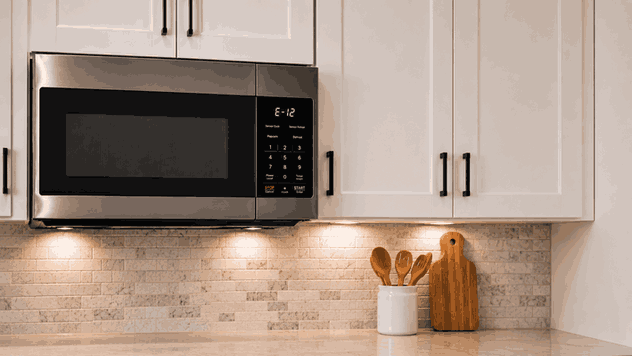
An LG microwave error code usually appears when the microwave cannot complete a safety, sensor, door, heating, or control confirmation. The display may show a code before the microwave starts, during heating, after the door is closed, or when a sensor-cooking function fails.
For San Jose homeowners, a microwave error code can be confusing because the appliance may still have power, lights, and a working display. That does not always mean the microwave is safe or ready to heat. The code is a signal that one part of the operating sequence is not matching what the control system expects.
Before an LG microwave can heat food, it must confirm that the door is closed, the control input is valid, and the internal systems are responding correctly. Some error codes relate to the door switch system. Others may involve temperature sensing, humidity sensing, keypad input, inverter behavior, fan response, or control communication.
This is why an LG microwave error code should not be treated only as a display issue. The microwave may be stopping because it cannot verify a condition needed for safe operation.
The timing of the code helps explain the fault pattern. If the code appears immediately after closing the door, the microwave may be reacting to a door-switch or latch-confirmation problem.
If the code appears after pressing Start, the issue may involve control response, heating confirmation, fan operation, or inverter-related behavior. If the error appears during sensor cooking, the microwave may not be receiving the expected signal from the sensor system.
If the code returns after a reset, the problem is less likely to be a one-time interruption and more likely to need diagnosis.
A microwave may show small warning signs before the error becomes consistent:
Code appears on the display
Microwave powers on but will not heat
Controls respond slowly or unevenly
Door must be closed more than once
Cooking stops before the timer ends
Sensor cooking fails or cancels
Fan sounds different than usual
The same code returns after restarting
These details help show whether the fault is connected to the door, keypad, sensor system, heating response, or internal control behavior.
Some microwave error codes may start from basic visible conditions. The door may not be fully closed. Food debris near the latch area may prevent smooth door contact. Moisture or residue on the control panel may also affect touch response on some models.
Other causes are repair-level. A faulty door switch, keypad issue, sensor fault, fan problem, inverter fault, magnetron-related issue, wiring communication problem, or control-board failure can cause the error code to return even after basic checks.
Microwaves are different from many other appliances because high-voltage components inside can remain dangerous even after the unit is unplugged. That is why internal inspection should be left to a trained technician.
Keep checks limited to safe, visible steps. Open and close the door normally. Make sure nothing is blocking the latch area. Wipe visible food residue from the door frame and control area with a soft cloth.
If the error appeared during sensor cooking, try a basic timed-cook setting after the microwave has cooled. If the error returns, stop using the appliance.
Check whether the outlet has power and whether the display responds normally. If the microwave repeatedly trips a breaker or shows signs of burning smell, sparking, smoke, or unusual buzzing, stop using it and request service.
Do not remove the microwave cover, test internal parts, inspect wiring, touch high-voltage components, or continue running the microwave with repeated errors. Microwave interiors can be dangerous even when disconnected from power.
Unplugging or resetting the microwave may clear the display briefly, but it does not correct a failing door switch, sensor problem, inverter fault, control issue, or heating-system failure.
Repeated attempts can also make the problem harder to track. If the error appears at the same point each time, that timing is useful for diagnosis. If the microwave stops heating, cancels sensor cooking, or returns the same code, the appliance should be checked before continued use.
Bestech Repair approaches an LG microwave error code by looking at when the code appears and what the appliance is trying to confirm at that moment. A technician can evaluate door-latch behavior, control response, keypad input, sensor function, fan operation, heating sequence, inverter response, and control communication.
The goal is to identify whether the issue is a simple visible condition or an internal microwave fault that needs repair. This helps restore safe operation without unnecessary guesswork.
In San Jose homes, a microwave that stops with an error code can interrupt daily cooking, reheating, and meal prep. Built-in and over-the-range models can be especially inconvenient when they fail because they are part of the kitchen setup.
Bestech Repair provides LG microwave repair in San Jose, including error codes, no-heat problems, door-switch issues, keypad faults, sensor-cooking failures, fan concerns, and control problems.
An LG microwave error code usually means the appliance cannot confirm a door, sensor, heating, keypad, fan, inverter, or control condition. Homeowners can safely check the door area, visible residue, control response, and outlet power. Do not open the microwave cover or inspect internal parts. If the code returns, professional microwave diagnosis is the safer next step.
Bestech Repair – San Jose, CA
📍 Address: 919 S Winchester Blvd, San Jose, CA 95128
📧 Email: office@bestechrepair.com
📞 Phone: +1-408-906-8668
🕒 Open Hours: Monday – Sunday: 8:00 AM – 8:00 PM.
Read reviews about our repair, installation and maintenance services. Our trained experts are always ready to help. To schedule your next appointment, give us a call or complete our online form.

Leave your contact details for communication with the operator, indicate a convenient date for yourself and our operators will contact you or call us: