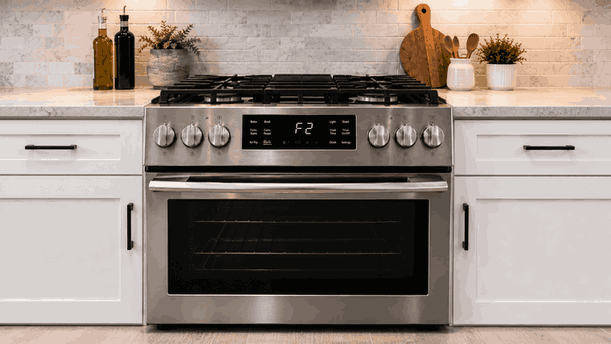
A Thermador range induction E7010 E9000 U400 connection and voltage problem usually means the appliance is detecting a communication, power-supply, or voltage-related fault. The range may still power on, but induction zones may not heat, smart features may disconnect, the display may show an error, or cooking may stop unexpectedly.
For San Jose homes, this issue should be handled carefully because it can involve both electronic controls and high-load induction power. The cause may relate to WiFi or connected-feature communication, voltage supply, power module response, wiring feedback, control-board logic, or installation-side electrical conditions.
A Thermador induction range must verify stable power and communication before it can heat safely.
The appliance may need to confirm proper voltage, module communication, control-panel response, and connected-feature status. If any of those signals are missing or outside the expected range, the range may block heating or show E7010, E9000, U400, or a related fault.
Induction zones require strong and stable electrical supply. If the range detects voltage irregularity or communication failure, it may shut down to protect the electronics, power modules, and heating system.
A Thermador range induction E7010 E9000 U400 connection and voltage problem may appear during startup, after a power event, when selecting a zone, or when using connected features.
Homeowners may notice:
E7010, E9000, or U400 on the display
Induction zones do not heat
Range turns on, then shuts down
Error appears after a breaker trip or outage
Touch controls respond inconsistently
Cooktop works briefly, then stops
WiFi or Home Connect features disconnect
Error returns after reset
If the error appears during WiFi setup or smart-feature use, the issue may involve connection or communication. If it appears when heating starts, the fault may involve voltage supply, power modules, wiring feedback, or induction load response. If the range trips the breaker, stop using it and request service.
These codes should be separated because they may point to different systems.
An E7010-type issue may involve WiFi, Home Connect pairing, router changes, hood connection, software response, or communication module behavior. Manual heating may still work if the fault is limited to smart communication.
E9000 or U400-type problems may point toward voltage irregularity, power supply feedback, installation wiring, module protection, or internal electronic response. These faults should not be tested repeatedly by cycling power.
A network issue will not be solved by replacing heating parts. A voltage or power-module issue will not be fixed by reconnecting the app. The first failed function helps identify the correct repair path.
Homeowners can review a few visible details without opening the appliance.
Write down the exact code and when it appears. Check whether the range heats manually or only smart features fail. Note whether the issue started after a power outage, breaker trip, router change, app update, or installation work.
Make sure the touch-control surface is clean, dry, and clear of objects. If the range smells burnt, sparks, trips the breaker, or becomes unusually hot, stop using it.
Do not remove panels, test wiring or voltage, reset the breaker repeatedly, bypass safety functions, access power modules, or keep forcing heating if the same error returns.
A reset may clear the display briefly, but it will not repair voltage instability, power-module failure, wiring problems, software faults, or control-board communication issues.
If the Thermador range induction E7010 E9000 U400 connection and voltage problem returns after one basic restart, stop using the affected function. Repeated attempts can make the failure pattern harder to identify and may stress sensitive induction electronics.
Bestech Repair checks whether the range is failing because of smart communication, control response, voltage feedback, or induction power delivery.
A technician can evaluate display behavior, stored fault timing, touch-control response, Home Connect communication, voltage-related symptoms, power-module feedback, zone operation, wiring condition, overheating protection, and control-board activity.
The goal is to separate router, app, or pairing issues from a Thermador range voltage, wiring, induction module, software, communication, or electronic control fault.
A Thermador induction range with E7010, E9000, or U400 errors may look partly responsive but remain unreliable for cooking. Bestech Repair provides Thermador range repair in San Jose for connection faults, voltage problems, induction zone failures, Home Connect issues, control errors, and electronic cooking interruptions.
A Thermador range induction E7010 E9000 U400 connection and voltage problem may be caused by WiFi pairing trouble, Home Connect communication faults, power interruptions, voltage irregularity, breaker events, wiring issues, induction module faults, overheating protection, software errors, or control-board failure. Homeowners can safely check the exact code, timing, manual heating response, network-change history, and breaker behavior. If the error returns, professional diagnosis is the safer next step.
Bestech Repair – San Jose, CA
📍 Address: 919 S Winchester Blvd, San Jose, CA 95128
📧 Email: office@bestechrepair.com
📞 Phone: +1-408-906-8668
🕒 Open Hours: Monday – Sunday: 8:00 AM – 8:00 PM.
Read reviews about our repair, installation and maintenance services. Our trained experts are always ready to help. To schedule your next appointment, give us a call or complete our online form.

Leave your contact details for communication with the operator, indicate a convenient date for yourself and our operators will contact you or call us: