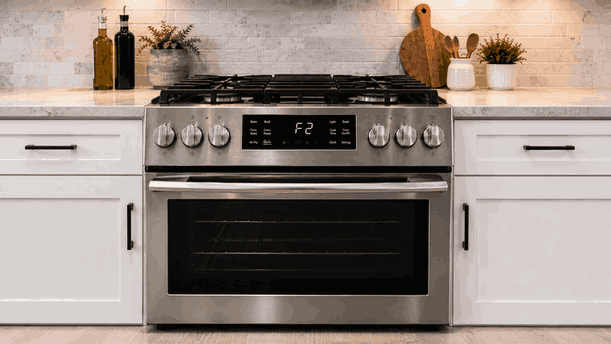
A Whirlpool range F2E1 grate position and FCE1 WiFi communication faults issue can involve two very different parts of the appliance experience: the physical cooking surface and the range’s electronic communication system. The range may show a keypad or control-related fault, warn about grate or burner placement, fail to connect to WiFi, or lose smart-feature response through the app.
For San Jose homes, this type of range problem should be reviewed by separating what happens at the appliance from what happens through the network. A cooking-surface warning may come from visible placement or sensor feedback, while a WiFi fault may involve app setup, signal strength, appliance communication, or electronic control failure.
A Whirlpool range may need to confirm proper control input, surface setup, burner or grate position, and electronic communication before all features work correctly. If the appliance detects an unexpected cooking-surface condition, it may display a warning or limit operation.
The F2E1 side can point toward a control/keypad or input-related issue depending on the model and symptom pattern. A grate-position warning may involve how the cooking surface is assembled or how the appliance reads surface conditions. The FCE1 WiFi communication side points toward a connection or smart-control communication issue.
When these appear together, the range may have both a visible surface-condition concern and a separate communication fault, or the control system may be misreading multiple inputs.
The range may respond normally for cooking but show WiFi or app-related failures. In other cases, the display may beep, show a fault, ignore certain commands, or report a grate-position issue even when the surface appears normal.
Homeowners may also notice that the Whirlpool app cannot connect, the range drops offline, remote features stop updating, or the appliance fails during pairing. If the control panel also behaves oddly, the issue may extend beyond the home network.
Some visible issues are simple to check. A grate may be sitting unevenly. A burner cap may not be fully seated. Cookware or debris may be interfering with the surface area. If the range was recently cleaned, parts may have been placed back slightly off position.
Repair-level causes are different. These may include a failed keypad, stuck button, damaged control interface, sensor feedback problem, wiring issue, electronic control-board fault, or appliance communication module problem.
The important distinction is whether the fault clears after visible surface parts are correctly seated, or whether it returns even when the range looks properly assembled.
A WiFi fault does not always mean the range itself is failing. The appliance may lose connection because of router distance, weak signal, changed password, app update, network reset, or temporary service interruption.
An appliance-side communication issue is more likely if the range cannot enter pairing mode, repeatedly fails to save settings, shows control-panel faults at the same time, or drops connection even with stable WiFi nearby. In those cases, the communication module, user interface, or main control may need professional diagnosis.
Homeowners can safely check whether grates, burner caps, and removable surface parts are seated evenly. Make sure the cooking surface is cool before touching any parts. Wipe visible debris from the surface only when safe and dry.
For WiFi symptoms, note whether the range is offline in the app, whether other devices connect to the same network, and whether the issue started after a router, password, or app change. Also note whether the range display shows other faults at the same time.
Do not remove panels, test wiring, open the control housing, bypass sensors, adjust gas valves, access internal electronics, or continue using the range if there is unusual smell, sparking, or unstable operation.
If this Whirlpool range uses gas and there is a strong gas smell that does not fade, stop using the appliance, ventilate the area, avoid flames or switches, and contact the proper gas emergency service before appliance repair.
Grate-position or communication faults should never distract from gas safety. If ignition, flame behavior, or gas odor appears at the same time, stop using the affected cooking area.
Bestech Repair checks whether the fault begins with surface setup, user-interface response, appliance communication, or control-board feedback. A technician can evaluate control-panel behavior, keypad response, surface-position clues, burner-cap seating, sensor feedback, wiring condition, WiFi module behavior, and electronic control communication.
The goal is to separate visible cooking-surface conditions and home-network issues from Whirlpool range control, keypad, sensor, communication-module, or board-level faults.
A Whirlpool range F2E1 grate position and FCE1 WiFi communication faults issue can affect daily cooking, smart features, control reliability, and confidence in the appliance. Bestech Repair provides Whirlpool range repair in San Jose for control faults, keypad issues, grate-position warnings, burner setup problems, WiFi communication symptoms, display errors, wiring faults, and electronic control-board concerns.
Whirlpool range F2E1, grate-position, and FCE1 WiFi communication faults may be caused by uneven grates, misseated burner caps, surface debris, control-panel input problems, keypad faults, weak WiFi signal, app or router changes, communication-module issues, wiring faults, sensor feedback problems, or electronic control failure. Safe checks include confirming surface parts are seated correctly, noting app/network behavior, checking whether other devices stay connected, and observing whether appliance faults appear locally on the display. If faults return after visible checks or the range shows control instability, professional diagnosis is the safer next step.
Bestech Repair – San Jose, CA
📍 Address: 919 S Winchester Blvd, San Jose, CA 95128
📧 Email: office@bestechrepair.com
📞 Phone: +1-408-906-8668
🕒 Open Hours: Monday – Sunday: 8:00 AM – 8:00 PM.
Read reviews about our repair, installation and maintenance services. Our trained experts are always ready to help. To schedule your next appointment, give us a call or complete our online form.

Leave your contact details for communication with the operator, indicate a convenient date for yourself and our operators will contact you or call us: